

The ClinLab software allows data updates in the database using batch import. Rules for records update are almost same as for import and it must meet the following conditions:
- File extension is txt or csv.
- File encoding is UTF-8 without BOM.
- Columns are separated by commas.
- Text does not need to be enclosed in quotation marks unless it contains a comma.
- Decimal numbers are separated by a dot.
- Dates are in the format DD/MM/YYYY.
- Checkbox values are "on" (checked) or "off" (unchecked).
- The first row contains a header with the identification of imported parameters.
- The first column contains the patient identification (idPatient), followed by the form definition (form) where the parameter we want to update is located, and then the parameter definition (param) separated by an underscore.
- For categorical parameters, the imported text value must exactly match the displayed text on the form.
Identification of patient parameters:
You can use the following items for identifying patient parameters:
Identifikátor | Popis | Formát |
|---|---|---|
idPatient | ID patient (mandatory) | number |
firstName | name | text |
lastName | surname | text |
sex | sex | M - male F - female |
address | adress | text |
personalID | personal identification number | 700101/1111 |
telephone | telephone number | (+420)731111111 |
healthInsurance | heath insurance | name of health insurance |
birthDate | date of birth | 01/01/1970 |
Identification of other form parameters:
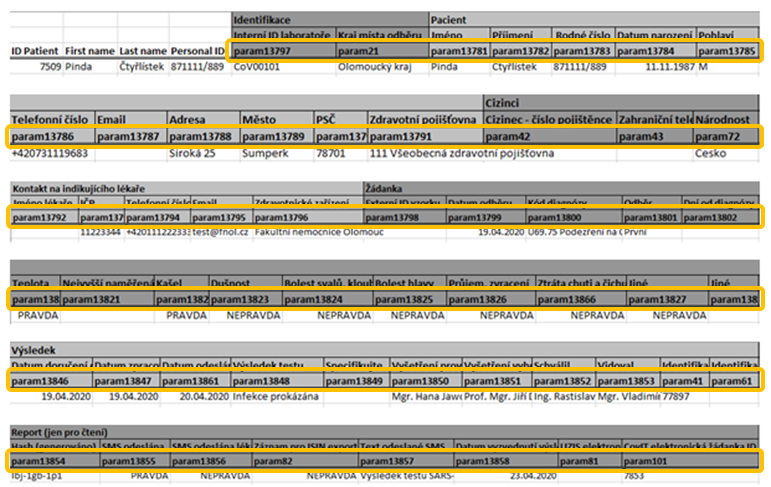
Identification of other parameters on the form can be found in the data export to xlsx format. The number of imported parameters is not limited.
The format for identifying an imported parameter is form{idForm}_param{idParam}.
Each form in the study has its own ID, and to retrieve it, you need to contact the administrator.
Each parameter in the form has its own ID. These IDs can be obtained from the data export to Excel.
Example of update batch files
Numbers with decimal comma are separated by quotes, and checkbox selections are set using the values on/off.


Description of the last example:
- Updating data for patient with ID 28620
- Updating data on forms 775 and 774
- Updating parameters 5119, 5120, 5122, 5123, and 6796